
If you have bought your new home or rented a new one, you might need to change the name of your electricity connection.
You can change the name online. And you can physically visit the nearest QESCO office to change the connection name.
How to Update the QESCO Connection Name Online
By following the given steps you can change the connection name online:
Step 1: Visit the Official Website of Electricity New Connection (ENC)
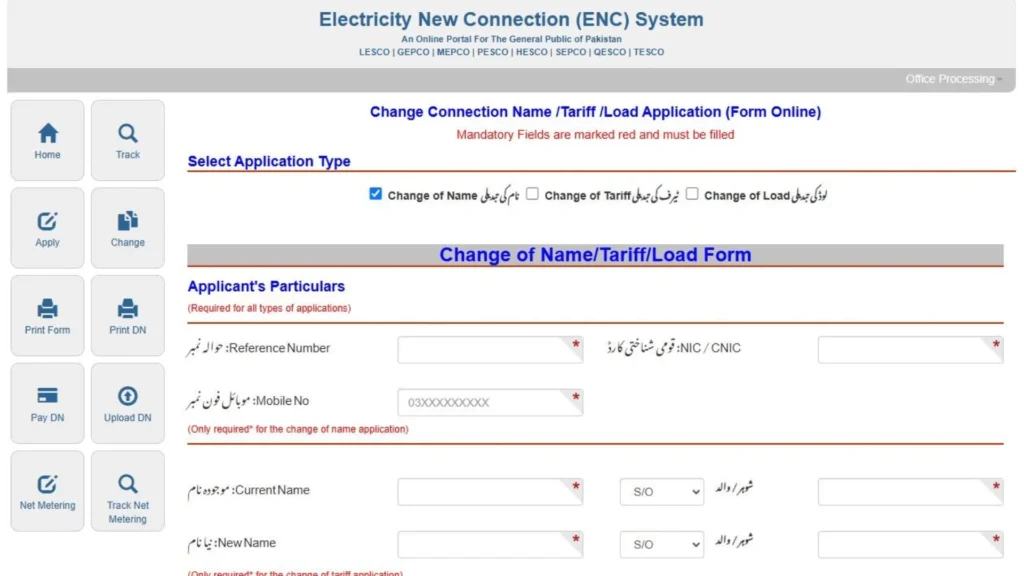
To update your name on your electricity bill, open your browser, and go to https://enc.com.pk/ . This site will allow you to change your name on your electricity bill.
Step 2: Tap the Change Name Option
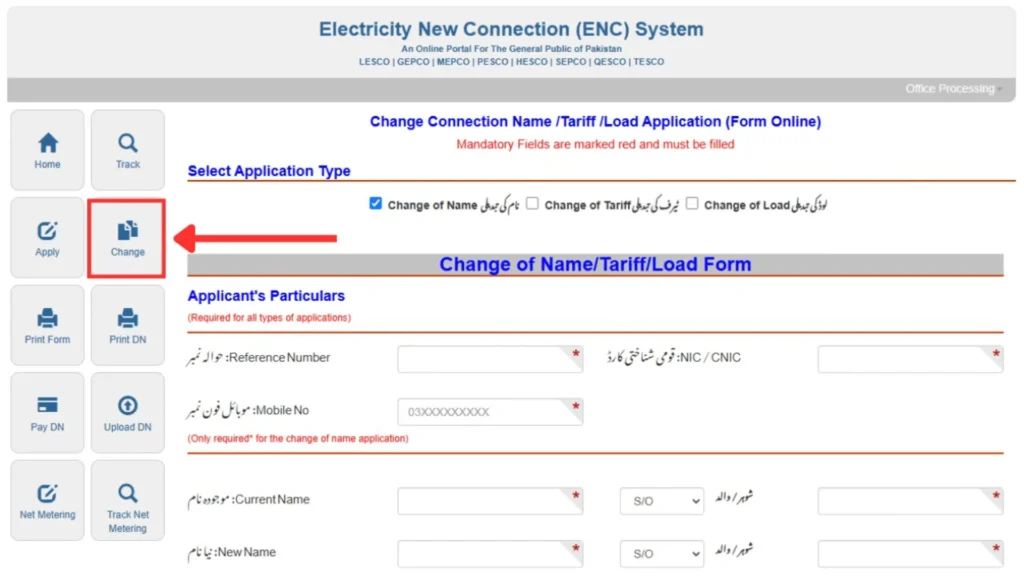
Once you open the site, you will see a “Change” button on the left side of the screen, click it, and proceed.
Step 3: Select Application Type
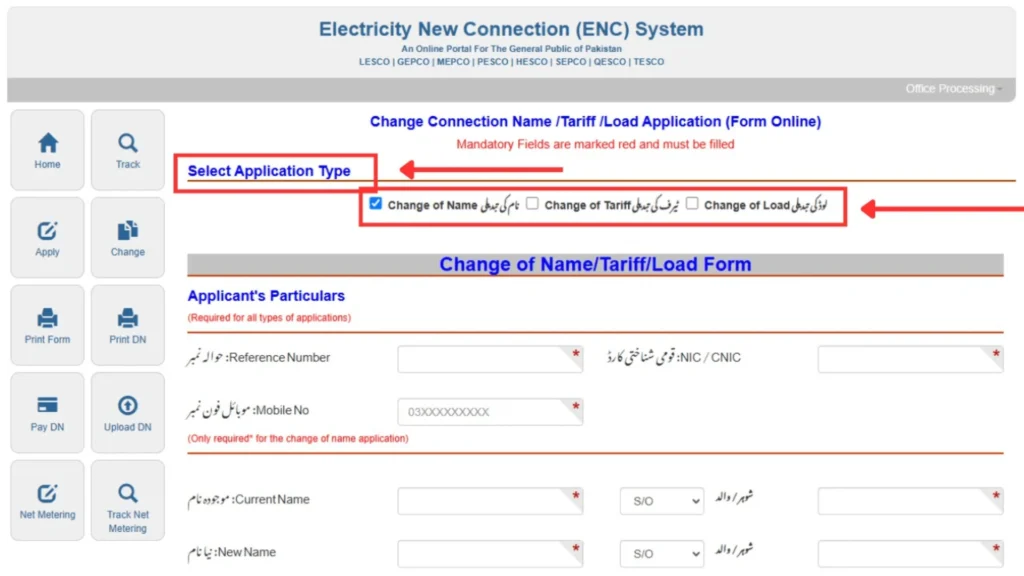
After following the “Change” button, you will be directed to a new screen. There will be three options: Change of Name, Change of Tariff, and Change of Load. You will select the “Change of Name” option.
Step 4: Enter Your Details
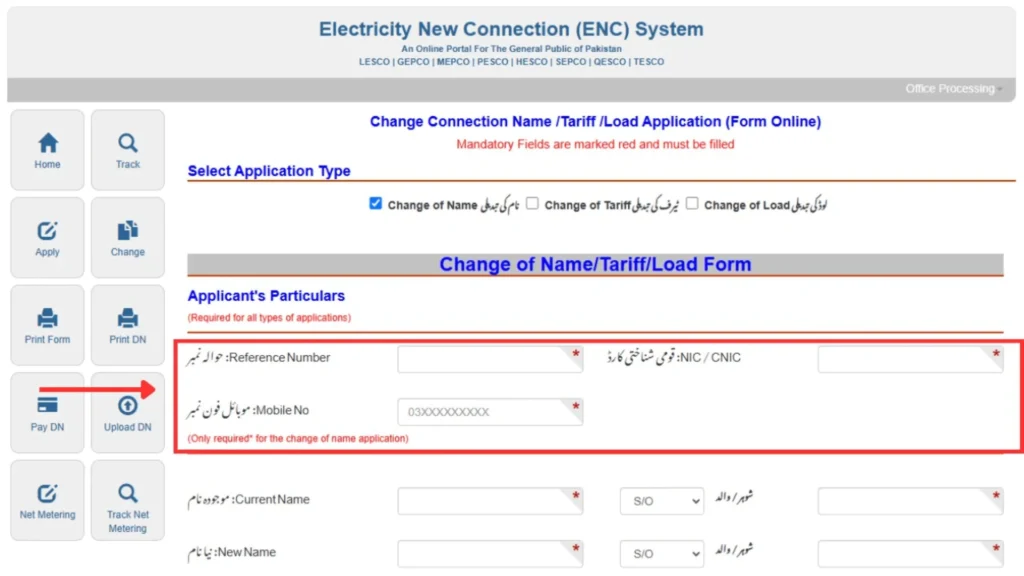
After selecting the “Change of Name” option, enter the required details: Reference Number of your QESCO bill, CNIC Number, and your phone number.
Step 5: Provide Current and New Name Information
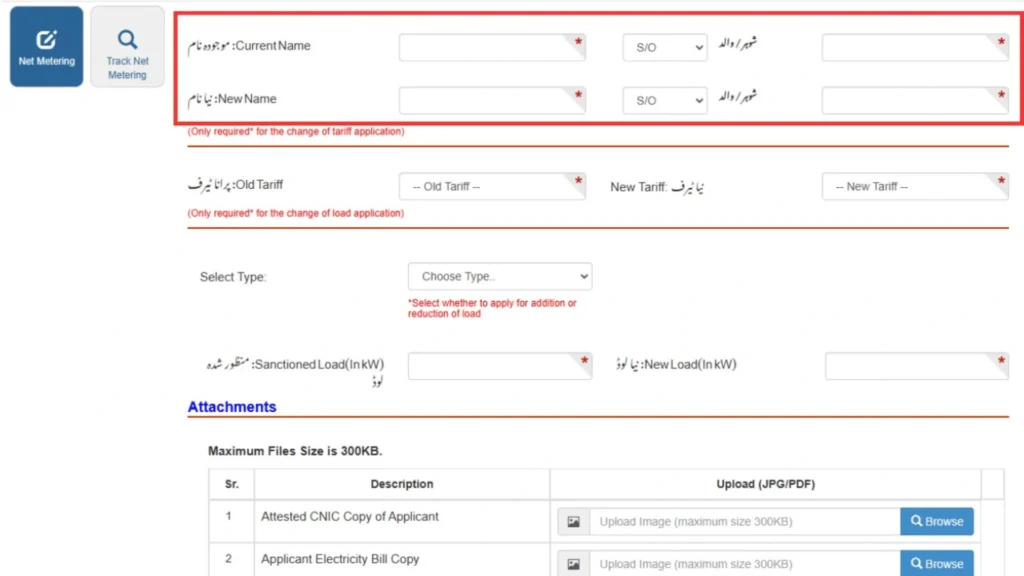
Provide the current and new name (or father’s/husband name) information. This includes:
- Current Name: The name which is already linked to your QESCO connection
- Current Father / Husband Name: The name which is already in use.
- New Name: The new name that you want to give to your connection.
- New Father / Husband Name: The new name you want to mention in your bill.
Make sure the details you entered are 100% correct as per your National Identity Card (ID card), otherwise you may face problems in further proceedings.
Step 6: Select Tariff Details
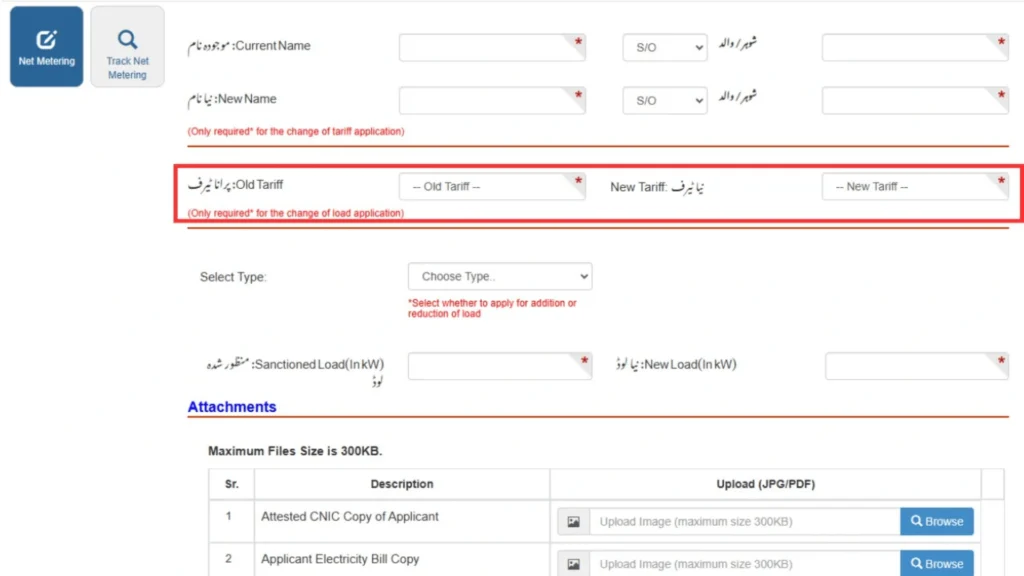
Choose the old and new tariff category. Make sure you choose the right category because each category has different per unit rates, and it will affect the amount of your bill.
Step 7: Specify Load Changes (if Applicable)
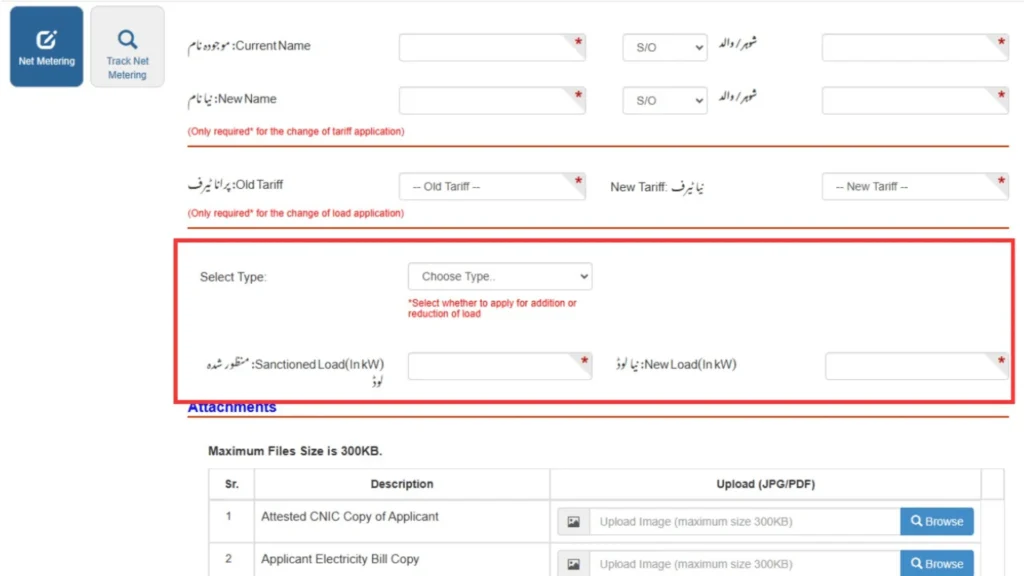
You can change the load of electricity as well. Click the dropdown right in front of the “Select Type” option. From this dropdown, you can choose if you want to increase or decrease the load. Once you have chosen your option, then fill in:
- Current Load (KW): The electricity that you can use right now.
- New Load (KW): The electricity that you will use in future.
Step 8: Upload Required Documents
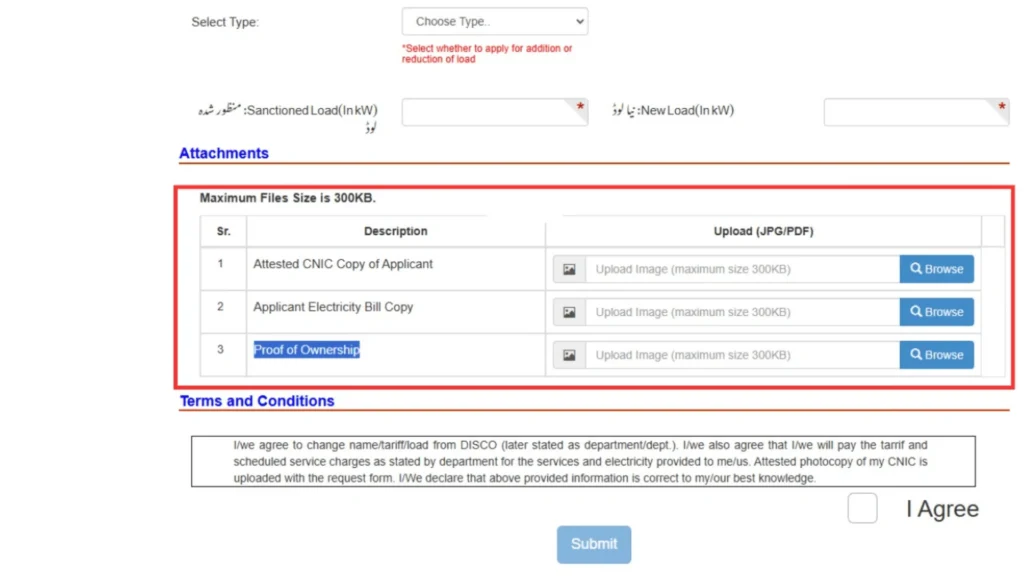
You need to upload the images of the following documents to proceed:
- Attested CNIC Copy: Upload the image of your ID card which is attested by some government official of 17th scale.
- Latest Electricity Bill: Upload the image of last month’s bill that you want to update.
- Proof of Ownership: You need to upload the images of documents (sales agreement, property papers, and other legal documents) that prove that the property and connection is owned by you.
Step 9: Agree and Submit
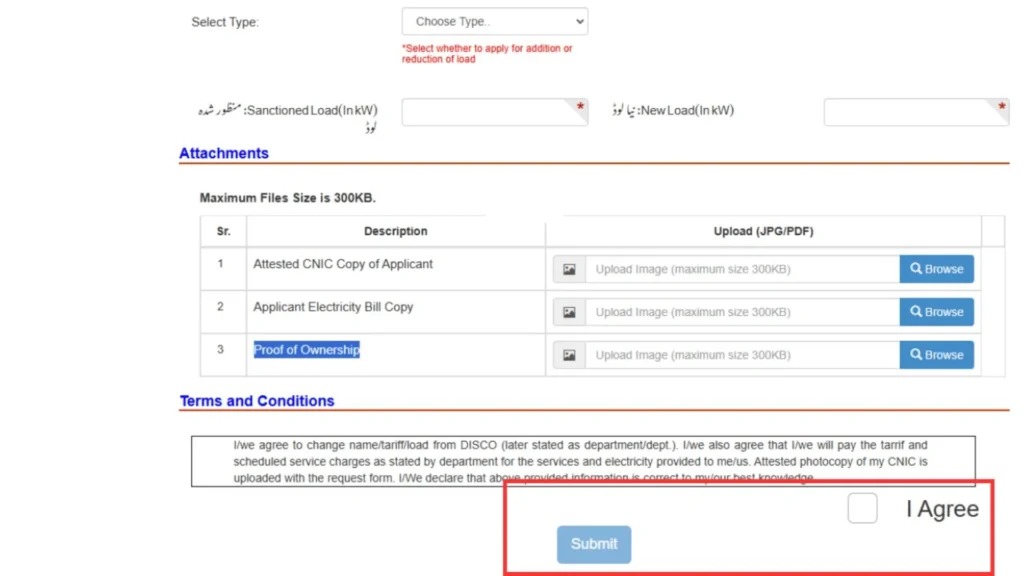
Now you can submit your application to update your bill. But before you submit this application, you are advised to double-check your details, and make sure all information you provided are 100% correct.
Once you are sure, tick the box to agree to the terms and conditions, and click “Submit”. Once you click submit, your application will be submitted.
Now you will receive a message with a tracking ID . With the help of this tracking ID, you can check the status of your application.
How to Update the Name of Your Bill Connection at QESCO Office?

You can submit your application at the QESCO office if you do not want to choose the online application option. So follow the given steps:
- Step 1: Visit Your Nearest QESCO Sub-Division or Customer Service Center
- Step 2: Get the “Name Change Application Form” from the staff
- Step 3: Fill Out this Name Change Application Form by providing the following details as per your CNIC and legal property documents:
- Your Reference Number
- Your Current Name on Bill
- New Name You Want
- CNIC Number
- Contact Number
- Address
- Meter Details
- Step 4: Attach the Required Documents like:
- Attested CNIC copy (new owner / tenant)
- Latest QESCO Bill
- Proof of Ownership (sale deed, registry, allotment letter, or tenancy agreement + NOC)
- Application form duly filled and signed
- Step 5: Submit the Application at the QESCO Office
- Step 6: Inspection and Verification by an inspector from QESCO
- Step 7: Pay the Required Fee
- Step 8: Wait for the Name Change Approval
FAQs
How can I change the name on my QESCO electricity connection?
You can change the name on your QESCO connection by applying online through the ENC website (enc.com.pk).
What documents are required to change the QESCO connection name?
You need an attested CNIC copy, latest QESCO bill, and valid proof of property ownership such as a sale deed, tenancy agreement, or allotment letter.
Can I change the QESCO connection name online?
Yes, QESCO allows online name change requests through the Electricity New Connection (ENC) portal without visiting the office.
How long does it take for QESCO to update the connection name?
Most applications are processed within a few days to a few weeks, depending on document verification and workload.
Is property ownership required for changing the QESCO connection name?
Yes, you must upload legal proof of ownership or tenancy to verify that you are eligible to update the name on the connection.
Can I track my QESCO name change application?
Yes, after submitting your form, you receive a tracking ID which you can use to check your application status on the ENC website.
Do I need to visit a QESCO office for the name change process?
In most cases, no. The entire process can be completed online, but QESCO may call you for physical verification if required.
Does changing the connection name affect the tariff category?
No, the name change does not affect your tariff unless you manually select a new tariff category during the application.
Can tenants change the QESCO connection name?
Yes, tenants can apply, but they must upload a valid tenancy agreement along with the permission or NOC from the property owner.
Is there any fee for changing the QESCO connection name?
Yes, QESCO may apply a processing fee depending on the type of request, which is payable after your application is reviewed.
Conclusion
If you want to update your name on your QESCO bill, you can easily do it online and offline. If you prefer to choose the online option, you can do it by going to the official website: https://enc.com.pk/.
If you choose the offline method, you will go to your nearest QESCO sub-division office. There you will follow the required procedure and your request will be submitted.
Just follow the given steps for online and offline submission of your application.