
Let’s say you have lost your bill, don’t worry. You can get a duplicate bill as well. We are providing you the easiest method to view, download and print your QESCO duplicate bill. In the following tool, choose Referenc no. or Consumer ID, enter your credential, click “Submit”, and you will be redirected to your duplicate bill. You can download and print it as well.
 Search Your Electricity Bill
What is the QESCO Duplicate Bill?
It is a copy of the original electricity bill that you can view, download, and print if you have lost the original bill, or did not receive it on time.
Information Shown in QESCO Duplicate Bill
This copy of the original electricity bill shows you all the information that is present in the official bill, such as:
- Total payable amount
- Due date
- Units consumed
- Taxes and surcharges
- Reference number
- Billing month
- Consumer ID
Requirements to Check this Duplicate Bill
You must meet the following requirements to check your duplicate bill:
Reference Number
This number is the most important to check the duplicate electricity bill. It is written at the top-right corner of your QESCO bill. Without this number you cannot get your duplicate bill.
Mobile Phone or Computer
You can check your electricity bill on any device: mobile phone or computer. Just open our website in the browser, enter your reference number, click “Check Bill”, and view your bill. You can download, or print your bill as well.
Internet Connection
It is important to have a stable internet connection, so that you can load and download your bill.
How to check QESCO Duplicate Bill Online?
Following are the easiest steps that will help you to view, download, and print your bill instantly:
- Select an Option: Either you choose Reference Number, or you choose Customer ID.
- Enter the Number: Enter the Reference Number or Consumer ID (whatever you have chosen).
- Click “View Bill”: Now click the “View Bill” button. Your bill will be shown to you.
- Download or Print: Now you can download or print your duplicate bill as well.
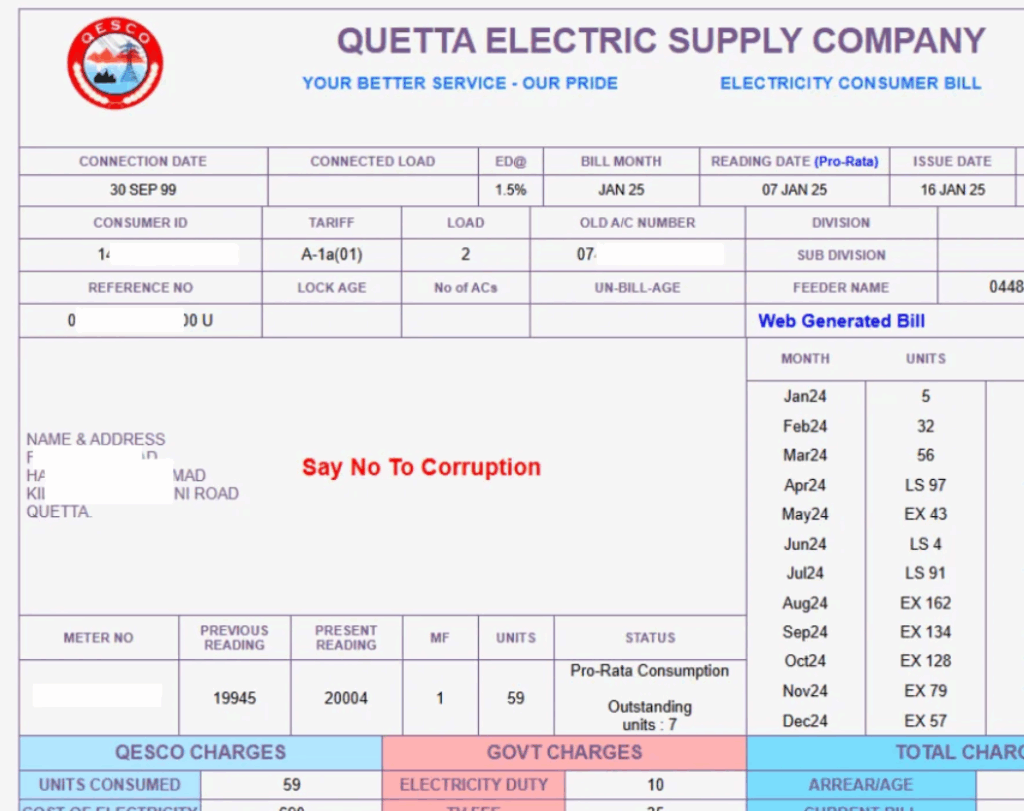
Important Note: If you put the wrong number, your bill won’t show. That’s why make sure you put the exact Reference Number or Consumer ID.
QESCO Bill Payment Options After Downloading the Duplicate Bill
You can pay your QESCO Bill Online through the following applications:
- Jazcash
- Easypaisa
- Banking Apps like UBL, Alfalah, HBL, MCB, Meezan etc.
The QESCO consumers can pay their bills offline in the bank branches like HBL, UBL, MCB etc. Moreover they can pay through Post Offices, and retail shops.
Benefits of QESCO Duplicate Bill Online
Following are the amazing benefits of checking your Duplicate bill online:
- Quick and easy access to your bill.
- You can check your bill anytime and anywhere.
- No need to wait for the printed bill.
- It’s free of cost, you just need to have an internet connection on your mobile phone.
- You can download it and print it.
- Helps avoid late payment charges.
- Works on any device, such as: laptop, desktop, mobile, tablet etc.
- Accurate and updated information.
- Safe and secure.
- Useful for recordkeeping.
FAQs
How can I get a QESCO duplicate bill online?
You can get your QESCO duplicate bill online by entering your 14-digit reference number on the official QESCO bill check website and downloading the displayed bill.
Is the duplicate bill valid for payment?
Yes, the QESCO duplicate bill is fully valid for payment and can be used at all online and offline payment channels.
Can I check my bill without a reference number?
No, you cannot check your QESCO bill online without a 14-digit reference number, as it is required to access your account and bill details.
Can I pay my bill online?
Yes, you can pay your QESCO bill online using mobile apps like Easypaisa, JazzCash, or through your bank’s internet/mobile banking.
Why is my duplicate bill not loading?
Your QESCO duplicate bill may not load due to an incorrect reference number, server issues on the QESCO website, or internet connectivity problems.
How do I check old QESCO bills?
You can check old QESCO bills by logging into the QESCO online bill portal and entering your reference number, which will display both current and previous bills for download or printing.
Conclusion
The QESCO Duplicate Bill feature makes it easy for consumers to access their electricity bills anytime, anywhere.
Whether you have lost your original bill or need a copy for recordkeeping, you can quickly view, download, and print it online using your reference number or consumer ID.
The checking of your electricity bill online is easy and quick. Moreover the consumers can access it anytime and anywhere.